HRMS Software Built for Smarter Workforce Management

  • Centralize HR, attendance and employee operations
  • Connect workforce time with projects and daily work
  • Automate approvals, payroll inputs and employee self service
responsive website

Why Sprintly

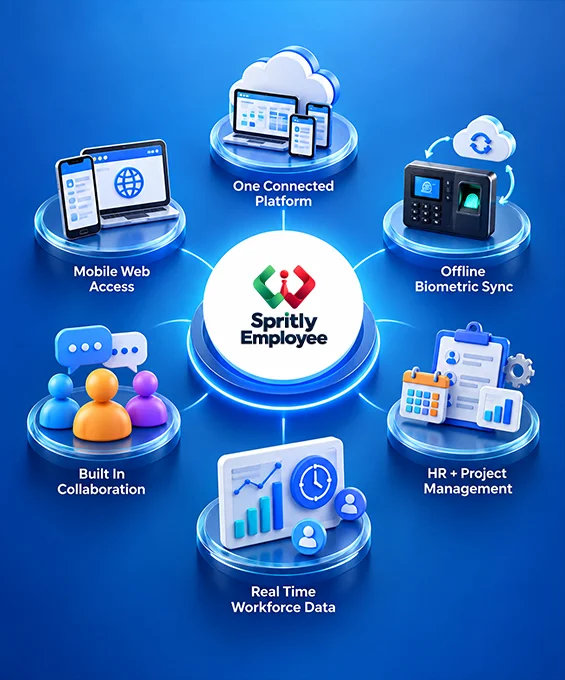
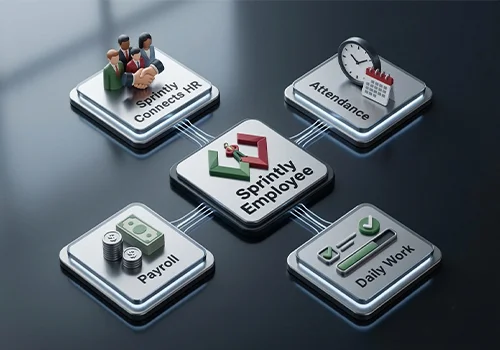
Sprintly Connects HR, Attendance, Payroll and Daily Work

Give HR teams and managers a clearer view of workforce activity, employee status and operational progress. Sprintly helps reduce routine coordination and supports faster, more informed day to day decisions.

responsive website

Attendance That Adapts to How Your Teams Work

while keeping workforce records consistent across different work environments. Employees can clock in through face recognition, fingerprint, secure PIN, NFC/RFID, mobile geofencing or the web, while Sprintly converts each attendance event into usable time and status data.
Beyond simple clock in and clock out tracking, the system calculates worked hours, multiple daily sessions, late arrivals, half day status, overtime and attendance deficits. For biometric environments, offline punches can also be stored locally and synchronized automatically when connectivity is restored, helping businesses maintain reliable attendance records without depending on continuous internet access.

responsive website
Live Attendance Records

Turn Daily Work Into Measurable Progress

Employee Side

Plan. Work. Share. Keep Moving.

Plan the Day

01

Choose the project, add assigned work and define what needs to be completed.

Log Actual Work

02

Record task activity, time spent, blockers and relevant pull request or work references.

Submit for Review

03

Send completed task cards and timesheets to the team lead for evaluation.

Sprintly Work Tracking

From daily work to real progress.

Project
Task Card
Time Logged
Blocker
Review
Progress

Manager Side

Get visibility. Drive outcomes.

Review Team Activity

01

See submitted task cards, employee hours and work status across active projects.

Track Delivery Progress

02

Monitor milestones, dependencies and completion levels without chasing individual updates.

Give Structured Feedback

03

Rate daily work as Excellent, Good or Needs Improvement and add qualitative feedback.

Identify Blockers Early

04

Spot delays, unresolved issues and workload gaps before they affect delivery.

Give Employees a Workspace of Their Own

  • Self Service

Handle Everyday HR Requests Independently
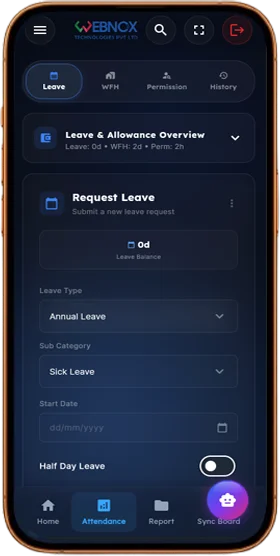
Employees can check available leave balances, submit leave, WFH and permission requests, monitor approval status and access attendance information from their own account.

Leave Balance
Apply Leave
WFH Request
Permission Request
Attendance Status
  • Work Updates

Keep Daily Work Visible to the Team
Employees can record their daily tasks, associate work with the right project, enter time spent and report blockers for team lead review.

My Projects
Daily Tasks
Hours Logged
Blockers
Submission Status
  • Documents & Communication

Keep Important Information Within Reach
Employees can view issued HR letters and payslips, receive company updates, find colleagues and communicate through TeamSync without switching between separate workplace tools.

Payslips
HR Documents
Company Notices
Employee Directory
TeamSync

Reduce Manual Payroll Preparation With Sprintly

With Sprintly

winspire-web-development-portfolio

Without Sprintly

winspire-web-development-portfolio

Why Businesses Choose Sprintly

Sprintly helps businesses reduce operational friction, improve workforce visibility and keep everyday work moving with fewer manual dependencies. By bringing critical workforce activity into a more structured operating environment, teams can spend less time on coordination, repeated follow ups and fragmented updates.
The result is clearer day to day visibility, faster decisions and more consistent execution across HR, managers and employees. Whether teams work from the office, remotely or across multiple locations, Sprintly helps businesses maintain better control over people, time and work without adding unnecessary complexity.

responsive website

FAQ

Questions Businesses Ask Before Choosing Sprintly

HRMS software helps businesses manage employee information, attendance, leave, payroll, documents and other HR processes digitally. Sprintly extends this further by also supporting project tracking, timesheets, employee self service and workforce collaboration within the same platform.

Workforce management software helps businesses plan, track and manage employee time, attendance, availability and day to day workforce activity. Sprintly combines these functions with HRMS, payroll, project management and employee operations to give managers broader workforce visibility.
Yes. Sprintly supports multiple attendance methods including face recognition, fingerprint, secure PIN, NFC/RFID, mobile geofencing and web clock in, allowing businesses to choose the method that best fits their workforce.
Yes. Sprintly’s biometric kiosk can store employee data and attendance punches locally when the internet is unavailable. Once connectivity returns, pending punches can be synchronized automatically with the server while preserving the original attendance timestamps.
Yes. Sprintly supports attendance linked payroll calculations, earnings and deductions, Loss of Pay, statutory components such as PF, ESI, Professional Tax and TDS, as well as automated payslip generation.
Yes. Sprintly supports project milestones, daily task cards, Kanban style sprint tracking, employee timesheets, work hour logging, blocker reporting and team lead reviews. This helps businesses connect employee time with actual project activity.
Employees can clock in, view leave balances, submit leave, WFH and permission requests, record daily tasks, access payslips and HR documents, use TeamSync and search the company directory through Sprintly’s mobile and web self service application.
Yes. Sprintly supports office based, remote and mobile work setups through biometric attendance, geofenced mobile punching, web clock in and employee access through mobile and web. This makes it suitable for businesses operating across different teams and locations.

CTA

Still Managing HR and Workforce Operations Across Separate Tools?